


TrailView
3.492.00 Reviews
App Specs
- Version
- 1.6.0
- Updated On
- License
- Free
- Downloads
- 50,000+
- Developer
- TrailView
- Categories
- Travel & Local
- Platform
- Android
Screenshots
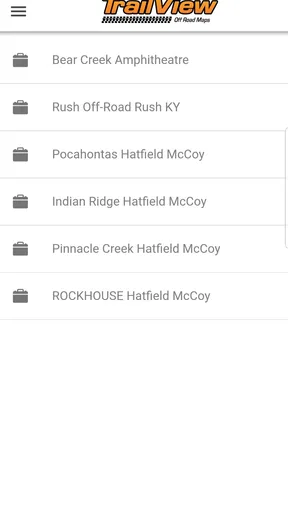
 Analysis by AppCompare
I judge an off-roading app by what it helps me do when a familiar route stops being familiar. TrailView is built around that problem: keeping trail exploration and navigation in view when you leave ordinary roads behind. I see the appeal most clearly for someone planning a day out, checking possible routes beforehand, or wanting a way to explore the outdoors from home. It is a free travel app from TrailView, with optional in-app purchases, and its focus is more specific than a general map app’s.
Keeping the trail in view
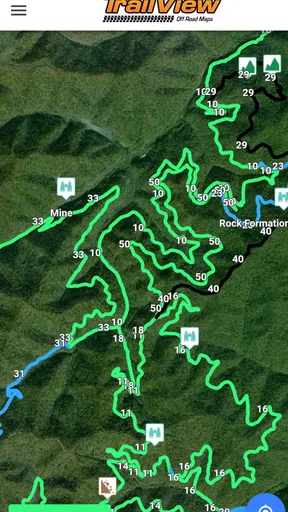
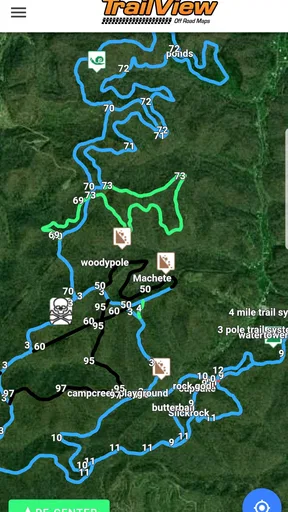
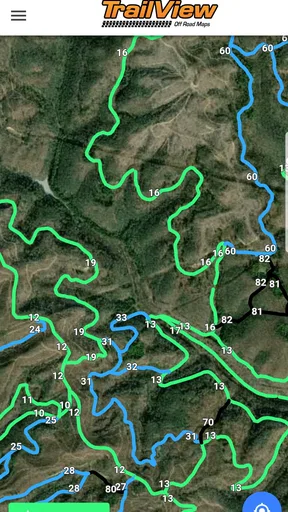
The idea behind TrailView is straightforward: it aims to help off-roaders avoid losing their way or overlooking trails. That focus matters because a route that looks simple on a broad map can become confusing when several tracks split from the same point. A dedicated trail-viewing tool can make those choices easier to think through before setting out, particularly when you are comparing possible routes rather than just asking for directions from one address to another.
I would treat it as a planning companion, not as a reason to stop paying attention to the terrain. Trails change, conditions vary, and a screen cannot make every decision for you. The practical value is in having a trail-oriented reference to consult alongside good judgement, preparation, and whatever navigation backup suits the outing.
How I would use it before and during a trip
Before leaving, I would use TrailView to get oriented and decide which trails are worth considering. That small planning step can save time at a junction later: instead of debating every branch from scratch, you can begin with a better sense of where you meant to go. If I were travelling with friends, I would also agree on a route and a fallback plan before the group spread out or lost easy access to a signal.
On the trail, I would check the app at deliberate moments, such as at a fork or before changing direction, rather than stare at a phone continuously. That is a useful habit with any navigation tool, but especially off-road, where attention belongs on the ground, other people, and changing conditions. A quick check can inform the next choice; it should not replace looking around and confirming that the route makes sense.
A realistic use case is a weekend drive to an unfamiliar trail area. I would review possible paths while still at home, decide which options fit the group and the vehicle, and keep a separate backup plan in mind. If a junction looks different from what I expected, TrailView can be one reference point while I pause, compare what I see, and choose cautiously. The key benefit is less uncertainty in preparation, not a guarantee that every turn will be effortless.
Where it fits among navigation choices
General mapping apps are convenient for everyday driving and broad directions, but their usual strength is getting from one known place to another. TrailView’s appeal is its off-roading focus: it is aimed at people whose route may involve trails rather than a standard street journey. For someone whose main need is trail discovery and keeping those routes in mind, that narrower purpose may feel more relevant than a map dominated by roads and errands.
Worth Reading Before You Choose

Flipboard Shows What News Apps Must Do Beyond the Feed

Switching to Android Auto Means Rethinking Your Driving Routine

Google Calendar Makes a Crowded Week Easier to Manage

Ludo King Makes the Most of the Minutes Between Plans

Baby Panda World Brings Quick Play to Modern Phones, but Its Game Library Feels Busy

ESPN’s Live Game View Makes Following Close Games Easier
That does not make a general map useless. I would still use one for the drive to a trailhead, checking nearby services, or getting a broad sense of the surrounding area. Nor would I assume one app should be the sole plan for remote travel. A paper map or another dependable backup can be sensible when the route matters and connectivity or battery life may become a concern. The trade-off is convenience versus resilience: a phone-based tool is easy to consult, while a backup reduces reliance on one device.
The approach I find most practical is to give each tool a job. Use TrailView to focus on off-road trail choices, a general map for the approach and nearby roads, and your own preparation for conditions the screen cannot judge. That avoids expecting a specialized trail app to serve as a complete trip-planning system for every part of an outing.
Small habits that make trail planning better
One useful habit is to decide what would make you turn back before you reach a difficult point. A trail reference can help with orientation, but it cannot decide whether the ground, weather, vehicle, or group is suited to continuing. Setting a turnaround condition in advance keeps a route choice from becoming a test of pride when plans meet real conditions.
I would also avoid making a last-minute route decision while driving. Review the likely options while parked, then check the screen only when it is safe to do so. If travelling with others, one person can handle navigation while the driver concentrates on the terrain. That division is simple, but it can make an unfamiliar outing calmer and reduce the temptation to rush a decision at a fork.
For a group, it helps to make sure everyone understands the intended route and what to do if people become separated. An app is most useful when it supports a shared plan, not when only one person knows where the group is headed. Keeping the plan clear also makes it easier to change course together if the route no longer feels appropriate.
What to expect from the app
TrailView has a modest footprint in the travel-app world: it has passed 10,000 installs and holds an average rating of 3.4 from 128 ratings, with 91 written reviews. I take that as a reason to approach it with sensible expectations rather than assume every user will find it a perfect fit. Its current version is 1.5.78, and it is rated for Everyone, so the basic audience is broad even though the intended use is quite particular.
The app is free to download, with in-app purchases ranging from $0.99 to $29.99 per item. I would check what an optional purchase offers before paying, and decide whether it supports the way I actually plan to use the app. If I only need an occasional reference for outings, I would be cautious about buying extras before I have tried the free experience. TrailView first appeared on April 9, 2019, and requires Android 7.0 or later, which makes device compatibility worth checking before planning around it.
One practical question is whether TrailView should be trusted as the only navigation source. My answer is no: for an unfamiliar or consequential outing, I would keep a backup and remain aware of the route around me. Another is whether it suits casual visitors. It can be worth considering if they want to explore off-road trails, but someone looking only for walking directions around town is likely better served by an everyday maps app.
It is also worth asking whether TrailView is for people who already go off-roading or for those just starting out. I think both can find a role for it, though beginners should pair any digital reference with basic route preparation and a conservative approach. Experienced users may appreciate a trail-focused tool as one part of their setup, but should not expect an app to replace local knowledge or sound decisions on changing ground.
Who will get the most from it
I would recommend considering TrailView if off-road trail exploration is a regular interest and you want a tool centered on that activity. It may also suit someone who likes to plan outings in advance, compare trail possibilities, or share the idea of an outdoor trip with friends before heading out. The strongest match is a person who sees an app as a helpful reference and is comfortable using it alongside common-sense preparation.
I would skip it if you mainly need reliable city directions, public transport planning, or a broad all-purpose navigation app. It is also not the right choice for anyone expecting a phone screen to remove the need for route judgement. When an outing depends on dependable navigation in difficult conditions, I would choose a setup with an appropriate backup rather than rely on a single app, however convenient it is.
The Virtual Trail Experience
First things first, let's talk about the interface. TrailView is super intuitive. I mean, even if you're not tech-savvy, you’ll find yourself navigating through trails like a pro. The app opens up with a map view, showcasing trails from around the world. What caught my attention is the sheer variety available. From the rocky terrains of the Rockies to the lush paths of the Amazon, the choices are endless.
As an armchair explorer, I was thrilled to find trails that I've only dreamt of visiting. You can virtually "walk" these trails using the app's interactive 360-degree views. It's almost like being there, minus the mosquitoes and blisters. The images are crisp and detailed, making you feel like you’re really part of the landscape.
Features That Stand Out
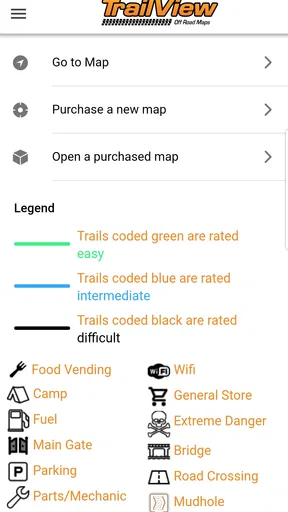
One of the coolest features is the way you can filter trails according to difficulty, length, and even scenery. This is a game-changer for planning future real-world hikes. You can also bookmark your favorites, which is perfect for someone like me who tends to forget things easily.
Another neat aspect is the community feature. TrailView allows users to share their own trail experiences and photos. It’s like Instagram for hikers. This makes the app not only a tool but a community of like-minded adventurers. I found myself scrolling through user-uploaded images and getting inspired by their stories.
Why You’ll Love It
If you’re considering downloading this app, here are a few reasons why I think it’s a no-brainer. Firstly, it’s a fantastic way to discover new trails you might want to visit in the future. Secondly, it’s incredibly educational. You can learn about the flora and fauna of different regions, and some trails even have historical tidbits attached. It’s like having a tour guide in your pocket.
For those days when you can't hit the trails, this app offers a perfect escape. Imagine sitting at your desk during a lunch break and losing yourself in the beauty of a mountain range. The mental refresh is real, and it’s much needed.
Final Thoughts
All in all, TrailView is a must-have for anyone who loves nature or simply enjoys a good virtual tour. It offers a unique blend of exploration and education, wrapped up in a user-friendly package. While nothing beats the experience of an actual hike, this app comes pretty darn close.
So, if you’re ready to explore the world from your living room, give TrailView a download. It’s a tiny app with a massive world to offer. Happy trails!
Pros
- User-friendly interface for easy navigation.
- Detailed trail maps with offline access.
- Real-time weather updates for safety.
- Customizable alerts for trail conditions.
- Social sharing to connect with fellow hikers.
Cons
- Limited free features without a subscription.
- Battery drain due to GPS tracking.
- Occasional map loading delays.
- Requires constant updates for accuracy.
- In-app ads can be intrusive.
FAQs for TrailView
What is TrailView and how does it work?
TrailView is a mobile application designed for outdoor enthusiasts who enjoy hiking and exploring trails. The app provides detailed maps, trail information, and real-time navigation features. Users can access offline maps, track their progress, and share their experiences with the community. It's a comprehensive tool for anyone looking to enhance their hiking adventures.
Is TrailView available for both Android and iOS devices?
Yes, TrailView is available for both Android and iOS platforms. You can download it from the Google Play Store for Android devices and the Apple App Store for iOS. The app is optimized to deliver a seamless experience across different devices and operating systems, ensuring that all users have access to its full range of features.
Does TrailView require an internet connection to function?
While TrailView offers offline map functionality, some features do require an internet connection. You can download maps ahead of time to use them offline, which is useful in remote areas without connectivity. However, features like real-time updates and community sharing will need internet access to function properly.
Are there any subscription fees or in-app purchases in TrailView?
TrailView offers a basic free version with essential features. However, to unlock advanced features such as premium trail maps, enhanced navigation tools, and ad-free usage, users may need to subscribe to a paid plan. It’s advisable to review the pricing details in the app to understand what is included in each plan.
How accurate and reliable is the trail information provided by TrailView?
TrailView prides itself on providing accurate and up-to-date trail information. The app sources data from a combination of user contributions and verified databases. While the app strives for accuracy, users are encouraged to cross-check trail conditions, as they can change due to weather or maintenance activities. Community feedback also helps improve reliability.


